For equipment service teams

Clean client inventories and a recall exposure report your hospitals can read.

When you win a contract, migrate a CMMS or absorb a merger, you inherit a messy inventory. We flag duplicate records, standardize manufacturer and model names, check every device against 24 months of FDA recalls, and hand back your file with the fixes and flags added. Then we can keep watching every client site for you, under your brand.

Built for Independent service organizations (ISOs) and multi-site biomed / HTM teams.

See sample reports first

How it works

  1. Send one export

    Export one client site’s asset list from your CMMS (CSV or Excel) and upload it with the request form. No patient data.

  2. Get the audit in 72 hours

    Open recalls from the last 24 months matched to your devices and graded by match strength, plus duplicate and missing-data counts.

  3. Clean up and keep watching

    If it’s useful, we clean the inventory and send a branded monthly recall exposure report for every site.

When teams call us

  • A new service contract win
  • A CMMS migration
  • A health-system merger or new site

Each of these leaves you with someone else's inventory: the same pump under four names, duplicate records, missing serials and no risk class. That makes recall checks unreliable and PM metrics wrong.

Do not upload patient information (PHI). Equipment lists only.

Offers and prices

Start free

Missed-Recall Audit

Free

1 site · report in 72 hours · no commitment

Send a CMMS export from one client site. Within 72 hours you get a missed-recall and duplicate-asset report.

  • 24-month recall lookback against FDA recall data (openFDA)
  • Each match graded: serial listed in the recall, all serials of the model in scope, or model match to confirm
  • Duplicate records, models spelled several ways, and records missing manufacturer, model or serial
  • A self-contained report plus a spreadsheet of matches
Start free

First site: pay after delivery

Quick Cleanup

$750 per site up to 1,000 devices, then $0.50 per device above that

  • First site: pay after delivery.
  • Included free for every site on a full-price annual Recall Watch plan.

A fast fix for one site’s inventory: duplicates flagged, names consistent, recalls checked.

  • Duplicate records grouped and flagged for your team to resolve (nothing is deleted or merged)
  • Manufacturer and model naming fixes, using our alias table checked against public FDA recall data (openFDA)
  • 24-month recall lookback against the standardized names

Payment: No deposit. Invoiced in full on delivery, and files are released once it is paid. Your first site: files first, invoice after.

Request Quick Cleanup

Full Migration

$3 per device $1,500 minimum

For a CMMS migration or a new contract: your inventory with standardized names and duplicates flagged, mapped and ready to import into your own system.

  • Everything in Quick Cleanup
  • Field mapping to your CMMS (TruAsset, TMS, eQ2 or whatever you use)
  • Proposed risk classes, for your staff to approve
  • An import-ready file for your CMMS

Payment: 50% to start, 50% on delivery.

Request Full Migration

Founding offer: 10 places

Recall Watch

$50 per site per month billed annually ($600 per site per year)

Founding price: $35 per site per month ($420 per site per year), locked for 2 years
Open to the first 10 service companies, with a minimum of 5 sites.

  • Quick Cleanup included free for every site on a full-price plan (not with the founding price).

A white-label monthly recall exposure report for each client site, sent under your brand.

  • Monthly matching of new FDA recalls against every client site
  • What changed since last month: new matches flagged, recall status changes listed
  • A branded monthly report you send to your hospital clients
  • A monthly review report, not real-time alerting: manufacturer letters still arrive first

Request Recall Watch

How payment works

  • Invoiced in US dollars (USD).
  • Pay by US bank transfer (ACH) or international wire.
  • Card payments are available on request and add 3%.
  • Quotes are valid for 30 days.
  • Invoices are due within 14 days. Deliverables are released on payment.

See what you get

These are real outputs from the tools we use, run on a fictional client's equipment list. The device models and FDA recalls in them are public data. Every report is a review aid, not a determination: your qualified staff confirm each match.

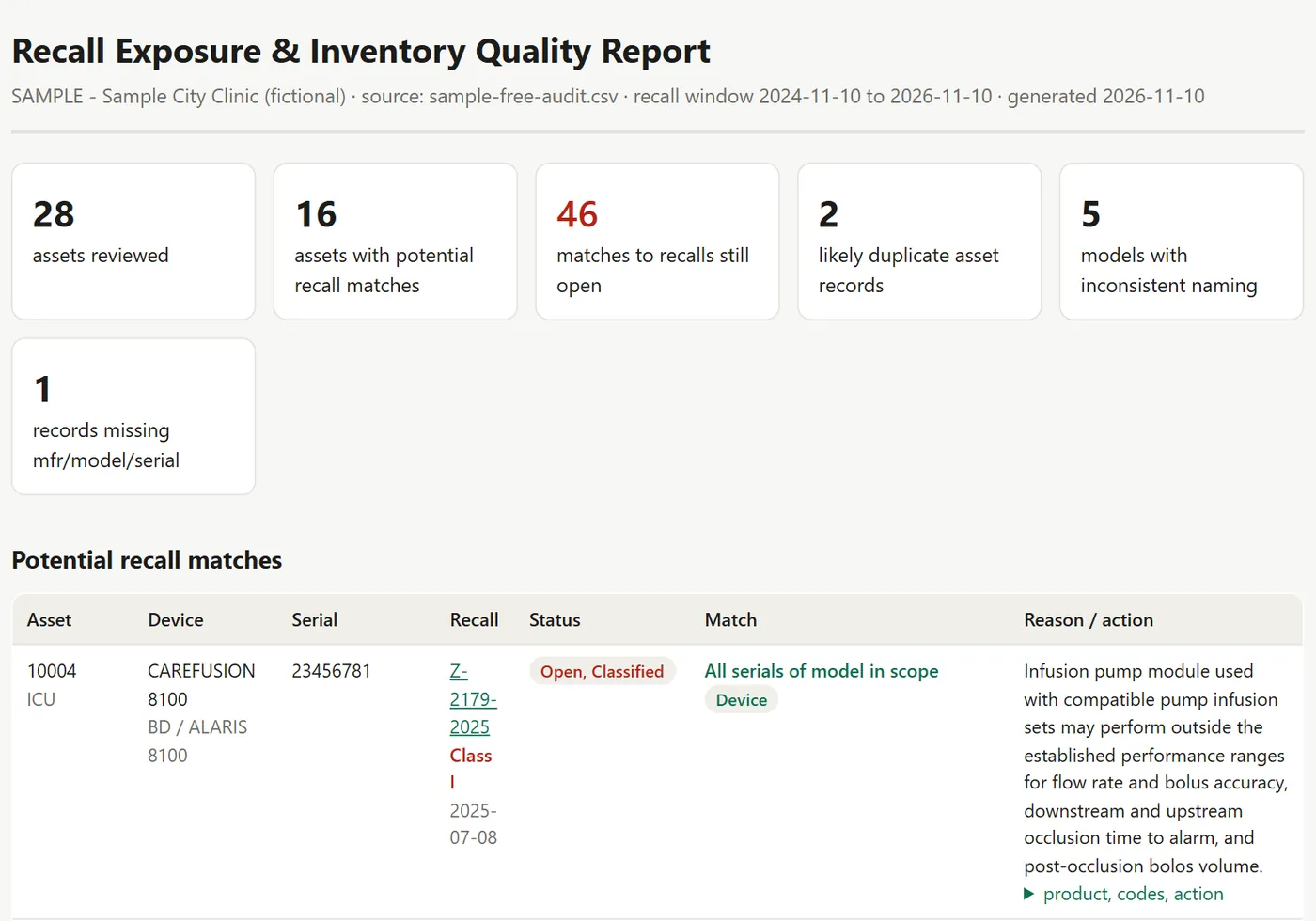
Sample · Fictional Data* Sample Missed-Recall Audit report for a fictional clinic: summary cards (28 assets reviewed, 16 with potential recall matches, 46 open recall matches, 2 likely duplicate records, 5 models with inconsistent naming, 1 incomplete record) above a table of recall matches, each graded by match strength.

Free Missed-Recall Audit. The summary, then every possible recall match with its strength: serial listed in the recall, all serials of the model in scope, or a model match to confirm. Sample for a fictional clinic.

Download a sample audit report (PDF, 63 pages, 560 KB, fictional client)

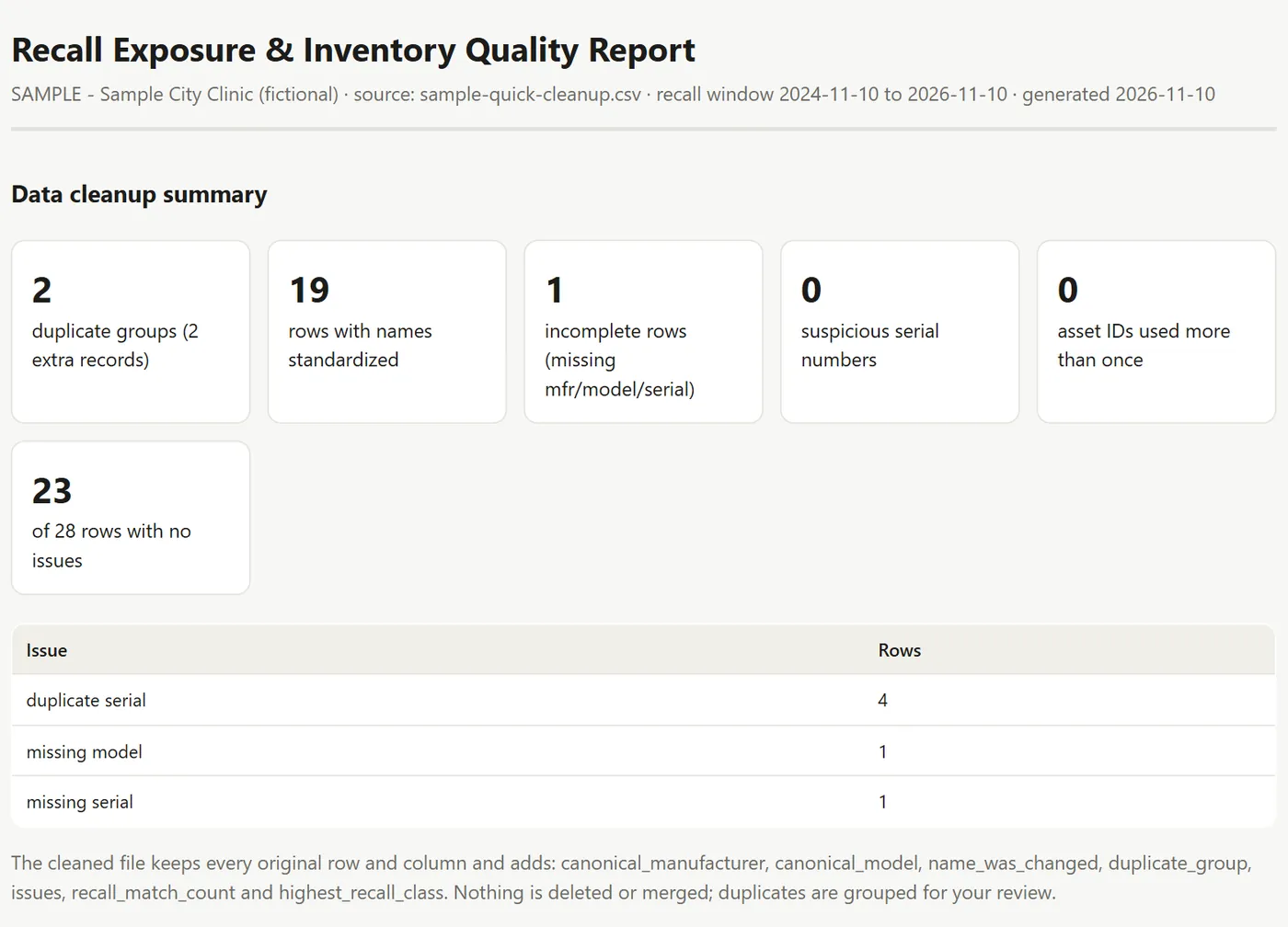
Sample · Fictional Data* Sample Quick Cleanup data summary for a fictional clinic: 2 duplicate groups, 19 rows with names standardized, 1 incomplete row, 0 suspicious serial numbers, 0 reused asset IDs, 23 of 28 rows with no issues, and a table of issues by number of rows.

Quick Cleanup. Your file comes back with every original row and column unchanged, plus columns for the standard name, duplicate group, issues and recall matches. Nothing is deleted or merged. Sample for a fictional clinic.

Download a sample cleaned spreadsheet (CSV, 28 rows, 3 KB, fictional client)

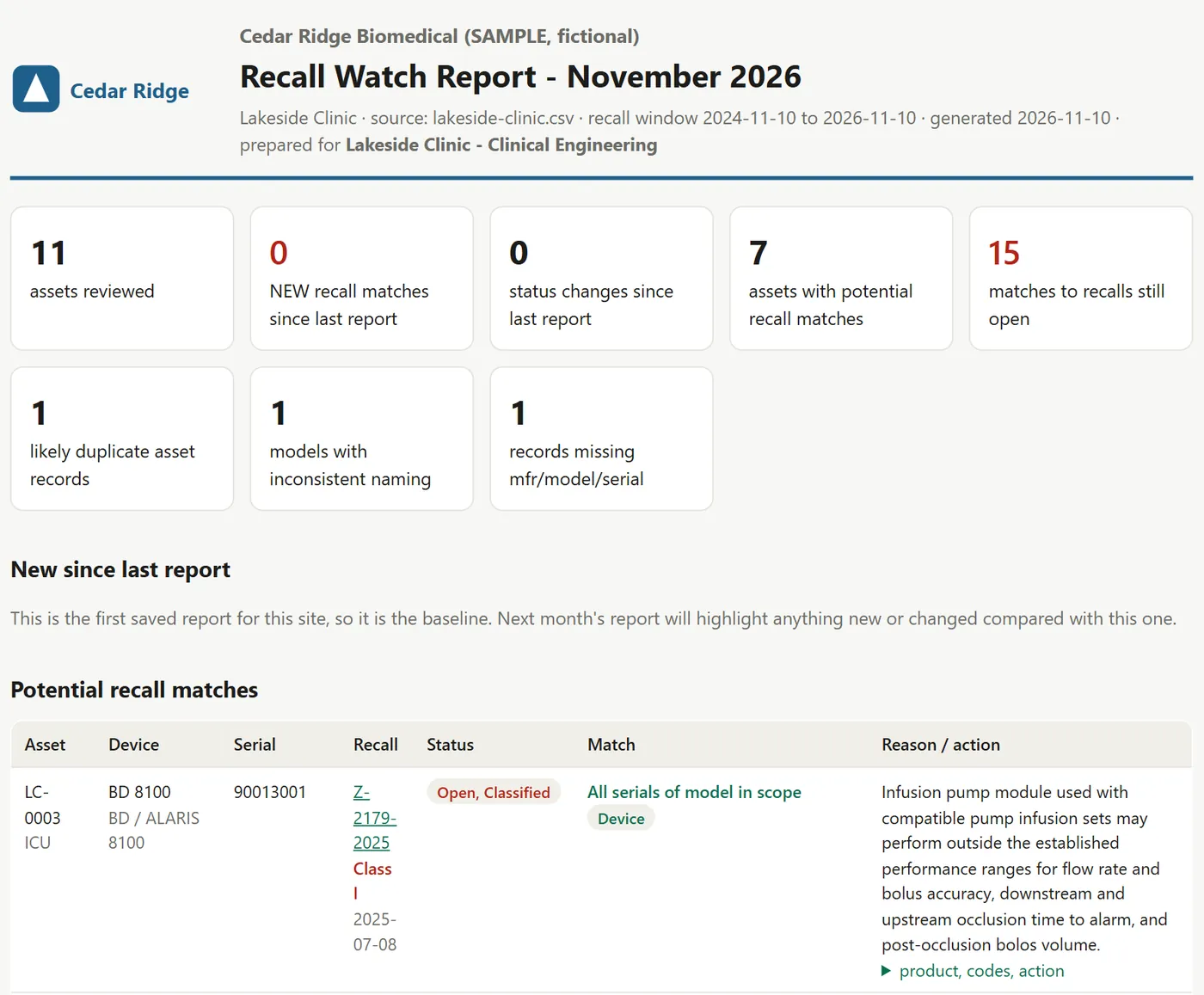
Sample · Fictional Data* Sample Recall Watch monthly report branded for a fictional service company, Cedar Ridge Biomedical: summary cards including new recall matches since the last report, status changes and open matches, a note that the first month is the baseline, and the first recall match.

Recall Watch. A monthly report for each site, under your company's name (here a fictional company). The first month is the baseline; later months mark new matches and status changes since the last report.

Download a sample Recall Watch report (PDF, 22 pages, 230 KB, fictional client)

* All samples use fictional data. Client files are confidential: they are never shown publicly or reused in samples.

What happens after you send a request

  1. You get a reference number

    It appears on screen as soon as you send the form, for example BBL-2026-0042. With it and your email you can follow progress on the status page. No account or password.

  2. We read it and reply

    We reply within 2 business days. We look at your request and any file you sent, and ask if anything is unclear. The free audit report follows within 72 hours.

  3. You approve a written quote

    Paid work starts only after you accept a written quote with the scope, price, timeline and payment terms. Quotes are valid for 30 days, and you can simply decline.

  4. Your files come back through the portal

    Reports and files are downloaded from the status page with your reference number and email.

Known limits

We would rather tell you now than have you find out later:

  • FDA data (openFDA) lags the manufacturer’s letter by weeks, so this is a lookback review, not real-time alerting.
  • Recalls that depend on a software version cannot be confirmed from CMMS data.
  • Serial matching can produce false positives on short serial numbers. Every match needs a person to confirm it.

Disclaimer. The recall report is a review aid, not a determination. Every match must be confirmed by qualified staff against the manufacturer’s notice, and a “no match” result does not mean a device is unaffected. We use public FDA data and are not affiliated with the FDA, ECRI or any CMMS vendor.

Questions

Which CMMS do you work with?

Any system that can export a spreadsheet: TruAsset, TMS, eQ2, AIMS, Nuvolo and others. For Full Migration we hand back an import file in the layout your CMMS expects.

What do I need to send?

For the free audit, one spreadsheet export of one client site's equipment from your CMMS (CSV or Excel). Asset ID, manufacturer, model, serial and department are enough. Nothing else is needed to start.

Do you need patient data?

No. We only need equipment records. Please remove anything that identifies a patient before you send a file.

What if the report finds nothing?

Then you still have a record that the site's inventory was checked against 24 months of FDA recalls, plus the duplicate, naming and missing-data counts, which are often useful on their own. A "no match" result does not mean a device is unaffected: a missing serial or model, or a software version that CMMS data cannot show, can hide a match, so the report also lists incomplete records. The free audit carries no obligation either way.

Who checks the results?

Your qualified staff confirm each match against the manufacturer's notice. Our report is a review aid, not a determination: it grades every match by strength so your team knows where to look first.

Is Recall Watch real-time alerting?

No. The monthly report is a review of public FDA recall data, which arrives after the manufacturer's letter. It helps you catch what slipped through and show your clients the work, alongside your existing recall process.

What does "first site: pay after delivery" mean?

For your first Quick Cleanup site, we deliver the cleanup files and report first and invoice afterwards. It applies to the first site only. Later sites have no deposit either: they are invoiced in full on delivery, and the files are released once that invoice is paid.

Do you delete or merge duplicate records?

No. Your file comes back with every original row and column unchanged. We add columns that group likely duplicates, show the standard manufacturer and model name, and list the issues on each row, so your team decides which record to keep.

Can the monthly report carry our brand?

Yes. Recall Watch reports go out under your company's name to your hospital clients.

Where do the device names come from?

From our own alias table of manufacturer and model spellings, which grows with every file, checked against public FDA recall data (openFDA). We do not use or reproduce licensed nomenclatures.

Start with a free first result

A missed-recall audit for one site, a free calculator result, or a 30-day statistics pilot for your lab. No commitment.